The first dealership I worked with had a perfectly good CRM and a BDC that ran on a whiteboard. Leads arrived in the system, got assigned to a salesperson, and then sat there because the salesperson was on the lot. The BDC manager kept a separate spreadsheet so she could see who had actually been called. Two systems, one customer, and a monthly argument about whose numbers were right.
That gap is why dealership-specific CRM exists. A car deal is not a B2B sales cycle with different labels. It starts with a lead that may arrive from six places, runs through an up-system and a desk, and continues for years through service visits and trade-in cycles. eLeads CRM is built around that shape, and if you run a store, the difference matters more than any feature grid.
The dealership workflow a generic CRM misses
A generic sales CRM assumes a linear pipeline: lead, qualify, propose, close. A dealership runs a loop. Leads arrive from the website, third-party marketplaces, phone calls, walk-ins, and manufacturer feeds. The BDC works them in turns, sets appointments, and hands off to the floor. The floor checks the customer in, works the deal, and desks it. Finance writes the menu. Then the customer disappears for two years and comes back for service, which is where the next sale actually starts.
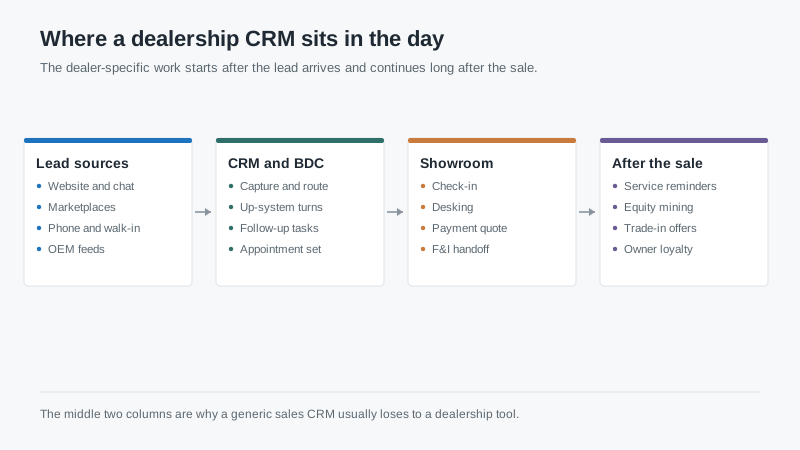
Most of that can be forced into a generic CRM with custom fields and a lot of configuration. I’ve seen it done. It works until someone leaves, the configuration is undocumented, and the next manager cannot figure out why appointment shows are being counted twice.
The reason dealer-specific tools win is not that they have more features. It is that the objects already match the work. Up-system turns, desking, F&I products, service appointments, and equity mining are native concepts instead of custom fields.
What to verify in a demo
Ask for a live walkthrough of each row below. A slide is not an integration, and a checkbox on a comparison sheet is not a workflow.
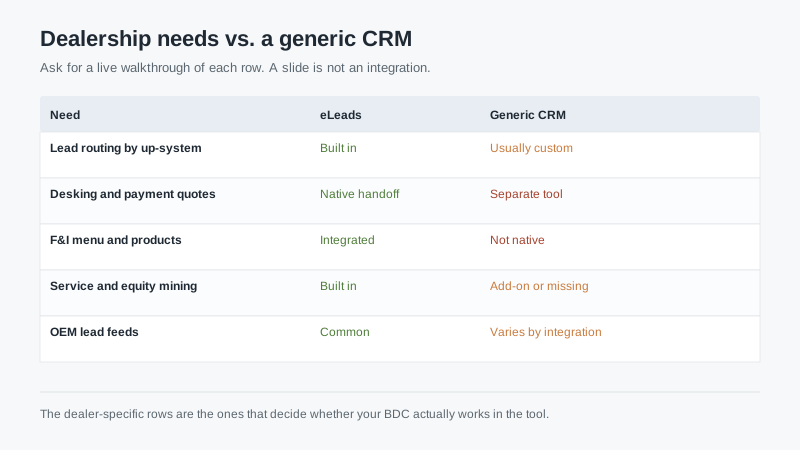
Lead routing by up-system. Every store has a rule about who gets the next up and how internet leads are distributed. Watch the routing run with a real batch of leads, including a duplicate and a lead from a customer who bought three years ago. Ask what happens when a salesperson is off shift or over their daily cap.
Desking and payment quotes. The desk is where deals are won and lost, and it is the part generic CRMs handle worst. Ask whether the quote pulls lender programs, whether it recalculates when the term changes, and whether the numbers the customer saw are stored with the deal. If desking lives in a separate tool, ask how the two stay in sync and who fixes it when they do not.
F&I handoff. The finance office needs the deal, the products, and the customer’s history in one place. Ask how the menu is presented, whether product eligibility rules are enforced, and what the audit trail looks like. This is also where compliance lives, so ask how consent and disclosure records are stored.
Service and equity mining. This is the long tail that most stores underuse. Equity mining works only if the tool can see the vehicle, the payoff, and the service history together. Ask where that data comes from, how often it refreshes, and what list a BDC would actually work on Monday morning.
OEM lead feeds. Manufacturer lead programs have their own formats and response-time requirements. Ask which brands are supported natively, which require a third-party connector, and what happens when a feed fails silently. A missed lead at 9 p.m. on a Saturday is a lost sale by Monday.
The DMS question
Every dealership CRM has to talk to the dealer management system, and this is where implementations get expensive. Ask whether the connection is two-way, which fields sync, and how often. Ask what happens when the DMS is down. Ask who owns the mapping when your accounting office changes a schedule.
Then ask the question that reveals the real cost: when a deal is desked in the CRM and contracted in the DMS, which system is the source of truth? If the answer is “both,” you will spend the next two years reconciling reports.
Pricing and contract reality
Dealer software pricing is rarely published, and quotes vary by rooftop count, user count, and bundle. Expect per-user pricing with a minimum, plus modules. Expect a setup fee. Expect the number to move when you add a second store.
Three contract items deserve attention. First, term length and auto-renewal notice. Dealer contracts often run 12 to 36 months with a notice window measured in weeks, and missing it costs a year. Second, data ownership and export. Ask for the export format in writing, including call recordings, texts, and deal history. Third, seat definitions. A “user” may mean anyone who logs in, including BDC agents and service writers, which changes your cost per rooftop.
Also ask how the system handles texting and calling compliance. Consent capture, opt-out handling, and record retention are not optional in this industry, and the rules have tightened. A tool that makes it easy to text a customer is only useful if it also makes it easy to prove you were allowed to.
Who eLeads fits
It fits franchised dealers and groups where the BDC, the floor, and the service drive need to work one lead through a shared process. It fits stores that use equity mining and service marketing as a real revenue channel rather than an afterthought. It fits groups that want one vendor accountable for the customer record from lead to trade-in.
It fits less well for independent used lots with three salespeople and a simple process, where a lightweight generic CRM and a good DMS integration will cost less and do the job. It also fits less well if your group has already standardized on a platform and the real problem is adoption rather than tooling. Buying another system does not fix a process nobody follows.
How to run the evaluation
Give the vendor your three worst leads from last month: an internet lead that went cold, a repeat customer who bought elsewhere, and a service customer with positive equity who never got a trade-in call. Ask them to walk the workflow for each, live, in the system.
Then talk to two references of similar size and brand. Ask what the implementation actually cost versus the quote, how long it took to get the DMS connection working, and what they stopped using after six months. The last question is the most revealing, because every store abandons something.
Finally, ask what the store looks like on a Monday when the CRM is down. If the answer is “we go back to the whiteboard,” you have learned something about how deeply the tool is actually embedded. That is worth knowing before you sign a three-year deal.
If you are comparing this against general-purpose platforms, the shortlist guide explains where a generic CRM stops fitting, and the CRM fundamentals guide covers the adoption problems that hit dealerships and B2B teams the same way.

