A marketing manager I worked with once described her HubSpot renewal as “the year the contact list became a line item in the family budget.” Her team had 22,000 contacts, most of them from a trade show list imported in 2019. Nobody had emailed 14,000 of them in two years. The platform was working exactly as designed. The bill was working exactly as designed too.
That is the HubSpot story in miniature. The product is genuinely good, especially for companies that want sales and marketing looking at the same record. The pricing model is also genuinely good at growing, and it grows along a different axis than most buyers expect.
One database, separately priced hubs
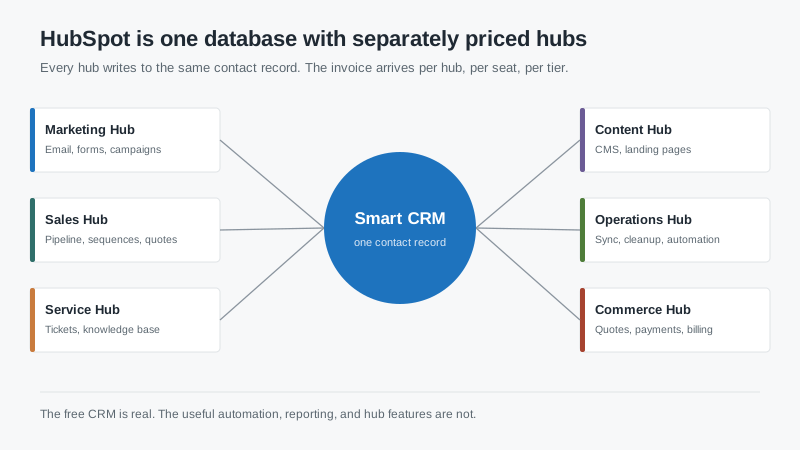
HubSpot CRM is not a product so much as a shared contact record with six paid modules attached. Marketing Hub handles email, forms, campaigns, and lead scoring. Sales Hub handles pipeline, sequences, quotes, and meetings. Service Hub handles tickets and the knowledge base. Content Hub runs the website. Operations Hub does data sync and cleanup. Commerce Hub handles quotes and payments.
All of them read and write to the same contact, company, and deal objects. That is the actual advantage. When a prospect fills out a form, opens three emails, and then calls in, the rep sees one timeline instead of three disconnected tools. Companies that have stitched together a marketing platform and a separate sales tool tend to underestimate how much time gets lost reconciling the two.
What it does better than most
Time to first value is short. A small team can be running a pipeline and sending tracked email the same week, with no implementation partner. That matters more than feature depth for companies that have never had a CRM, because the first win is behavioral, not technical.
The free tier is a real product, not a trial. It includes contact and deal management, email tracking, forms, and a shared inbox. For a company under ten people, it can carry you for a year while you learn what your sales process actually is. That is a rare and useful thing in this market.
Reporting is also friendlier than the enterprise alternatives for people who are not analysts. Building a funnel report takes minutes, not a data model. The trade-off is depth: once you want multi-touch attribution or custom objects joined across hubs, you are either paying for Operations Hub or exporting to a spreadsheet.
Where the bill grows
HubSpot prices along three axes at once: seats, hubs, and contacts. Buyers usually model the first and forget the third.
Marketing Hub tiers are priced by contact volume, and the bands are not gentle. Crossing a band mid-term can trigger a repriced contract at renewal, which is how a company with a static customer base ends up paying more every year for the same number of customers. If you import a large legacy list “just to have it,” you may be paying for it annually forever.
The second axis is hub sprawl. Sales Hub Professional is reasonable on its own. Add Marketing Hub Professional, Service Hub Professional, and Operations Hub Professional, and the annual number multiplies quickly. Onboarding fees are separate and are not always optional at the Professional and Enterprise tiers.
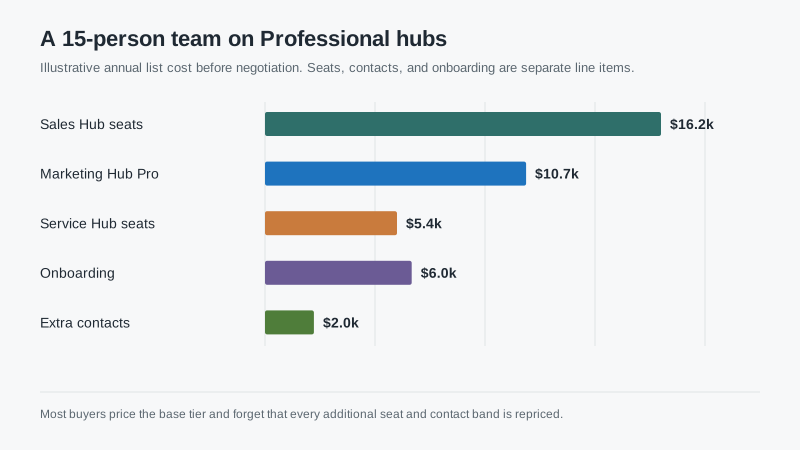
For a 15-person sales team with five service seats on Professional tiers, an annual list cost in the high thirties to low forties of thousands is realistic before negotiation. That is not outrageous for what you get, but it is roughly double what most buyers expect when they start with the free tier and the “from $20” headline.
The tier cliff that catches teams
Starter tiers look affordable and are genuinely useful, but they hit walls in predictable places. Custom reporting is limited. Workflow automation is capped. Sandbox access is not available at the lower tiers, which means changes go straight into production. Team permissions are coarse, so you cannot easily hide pipeline data from a new hire.
The cliff usually arrives around the time you hire your sixth or seventh seller. That is when you need round-robin routing, sequences with branching, and a report that combines marketing source with closed revenue. Those live at Professional. Budget for the jump when you plan headcount, not when you hit the wall.
Data model limits worth knowing
HubSpot’s core objects are contacts, companies, deals, and tickets. That covers most B2B sales motions well. It covers project-based or asset-based businesses less well. If you need to track a piece of equipment through service history, or manage a multi-stage project with its own tasks and billing, you will feel the edges. Custom objects exist, but they sit behind higher tiers and do not behave like native objects everywhere.
Associations are another quiet constraint. A contact can be associated with multiple companies, but reporting across those relationships gets awkward. If your business sells to a parent company with twelve locations and each location has its own buyer, decide early how you will model that. Fixing it after two years of data is expensive.
Who HubSpot fits
HubSpot fits companies where marketing and sales need one shared record and where someone can own the platform without being a full-time administrator. It fits teams that value speed of adoption over deep customization. It fits companies that will actually use email, forms, and lifecycle stages, because that is where the product’s advantage compounds.
It fits less well when you need heavy custom objects, complex territory and commission logic, or a sales process that changes per division. Those are Salesforce territory, and the Salesforce guide covers the cost of going that route. It also fits less well when your contact database is large, old, and mostly inactive, because you will pay for the privilege of storing people who will never buy.
What to pin down before you sign
Ask for the contact tier boundaries in writing and model your list at 12, 24, and 36 months. Ask which features require a higher tier than the one you are buying, specifically sandbox, custom objects, and workflow branching. Ask whether onboarding is mandatory and what it includes.
Ask what happens if you downgrade. HubSpot downgrades are possible but the feature loss is abrupt, and some data becomes read-only rather than deleted. Understand that before you build processes on top of a tier you might leave.
Finally, clean your list before you migrate, not after. Every contact you import is a contact you pay for, and a smaller, accurate database makes the reporting better and the renewal cheaper. That single step has saved more money for the companies I have worked with than any negotiation tactic.
If you are still deciding between platforms, the best CRM breakdown by team shape is a faster starting point than a feature comparison.

