I spent two years as the person who fielded “can Salesforce do this?” questions for a 180-person industrial supplier. The answer was almost always yes. The follow-up question, which nobody asked until the invoice arrived, was “and what will it cost to make it do that?”
Salesforce CRM is the most capable sales platform most mid-sized companies will ever evaluate, and also the easiest to overspend on. Both things are true at once. This is what I would tell a 20 to 100 person team that is seriously considering it in 2026, including the parts the sales deck tends to move past.
Who Salesforce fits, and who it does not
It fits companies with a sales process that is already documented and slightly unusual. If you sell through channel partners, run multi-year contracts with renewal motions, or need a customer record that spans sales, service, and a custom internal app, Salesforce earns its keep. The platform’s real strength is that it bends. Objects, permissions, flows, and APIs let you model a business that does not fit a template.
It fits less well when you have a simple, high-volume sales motion and no one who wants to administer a platform. I’ve watched a six-person team buy Enterprise edition because a consultant recommended it, then spend their first year paying an outside admin $2,000 a month to keep the lights on. They would have been better served by something they could run themselves.
One rule of thumb from my own experience: if you cannot name the person who will own Salesforce internally, including the hours, do not buy the tier that requires one.
Editions and what the price jump buys
Salesforce’s public list pricing runs from Starter Suite at roughly $25 per user per month up to Unlimited at roughly $330, with Pro Suite around $100 and Enterprise around $165. Treat those as approximate. Discounting is normal, multi-year terms change the math, and the number you sign is rarely the number on the website.
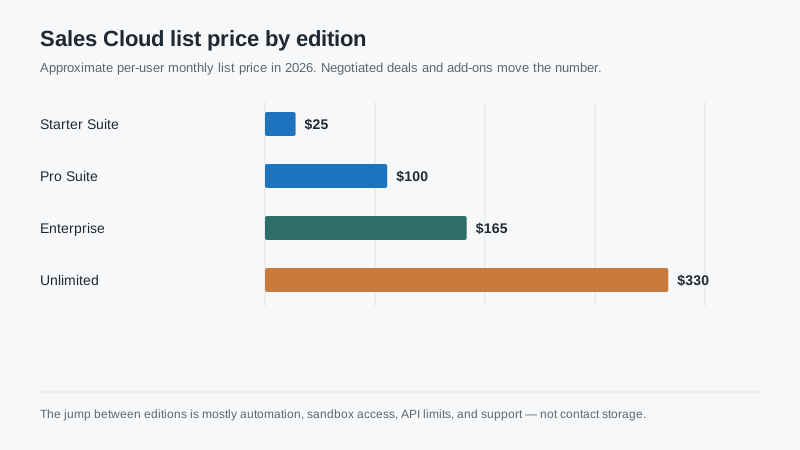
What actually changes between tiers is not contact storage. It is automation depth, sandbox access, API limits, permission granularity, and support. Starter Suite is a real product for small teams and includes a lot, but it constrains automation and reporting in ways you will feel by month four. Enterprise is where most serious implementations land, mostly because of sandboxes and the ability to test changes before they hit production.
The gap that surprises buyers is sandbox access. If your team cannot test a flow change without touching live data, you will either slow down or break something. That single feature often justifies the jump from Pro Suite to Enterprise, and it is worth pricing explicitly before you fall in love with the lower number.
The first-year number, honestly
Subscription is usually the smallest line in year one. For a 25-user rollout at Enterprise list, the subscription lands around $50,000 annually, though most buyers negotiate below that. Implementation services for a mid-market configuration commonly run one to two times the annual subscription if you are adding integrations and migrating dirty data.
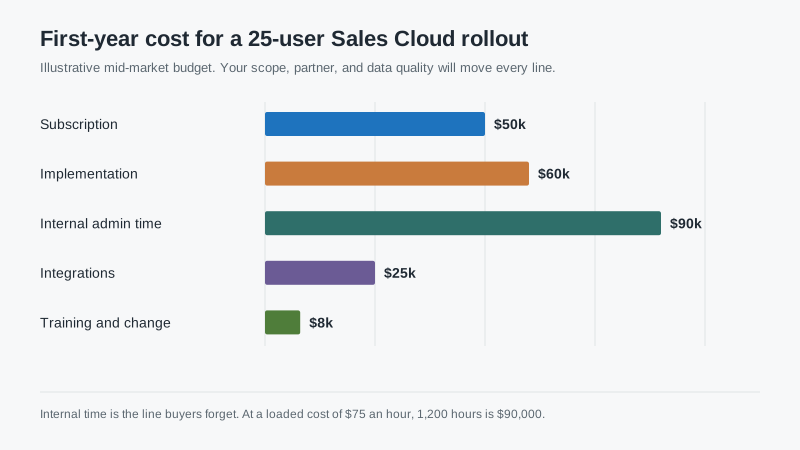
Then there is internal time. Someone has to decide what the fields mean, test the import three times, train the team, and answer the “why did this record disappear” question at 4:40 on a Friday. In my experience that is 800 to 1,500 hours in the first year for a team this size, spread across sales ops, IT, and one long-suffering sales manager.
Add integrations and the number moves again. If you are connecting an ERP, a marketing tool, and a quoting system, budget for each one separately. Every integration has an owner, a failure mode, and a monthly bill, even when the connector itself is free.
What implementation actually involves
The word “implementation” covers four different jobs that get bundled into one line item. Configuration is the visible part: objects, page layouts, permission sets, and the handful of automations that make the system usable. Data migration is the invisible part: mapping, deduplicating, and loading accounts, contacts, and history without destroying the thing you are trying to preserve. Integration is the fragile part. Training and change management is the part that decides whether any of it matters.
Most of the failed projects I’ve reviewed underfunded the second and fourth. The configuration looked fine. The data was a mess, and the team was never told what to stop doing. Six months later the CRM was accurate for the people who built it and ignored by everyone else.
Ask your implementation partner for a written scope that separates those four jobs. Then ask what happens when a workshop runs long. Change orders at $175 to $250 an hour are how a $120,000 project becomes a $190,000 project without anyone behaving badly.
The admin question
Salesforce does not run itself. A 50-user org with moderate customization needs roughly half a full-time person for support, automation changes, reporting requests, data cleanup, and release testing. If that person does not exist, the work lands on a sales manager or an outside consultant, and either way it competes with selling.
This is not a reason to avoid the platform. It is a reason to budget for it before you sign. A named internal admin, even part-time, is the single best predictor of whether a Salesforce investment holds up in year three. Our breakdown of what SFDC work actually consumes in a week goes deeper on that.
Contract terms that matter more than features
Read the renewal clause before the feature list. Salesforce contracts commonly include annual uplift language, and multi-year deals can lock in increases you did not model. Ask what the uplift is, when it starts, and whether it applies to add-on products you buy later.
Ask about seat true-up. If you buy 25 seats and hire 30 people, what happens? Most agreements let you add mid-term at list price and reconcile at renewal, which can produce a surprising invoice in month thirteen. Model a 20% headcount swing in both directions.
Ask what happens to your data on exit, including attachments and custom objects. Ask for the export format in writing. Then ask how long your automations will keep working if you downgrade a tier. Downgrades are harder than upgrades, and the features you lose are rarely the ones you expected.
When a simpler tool is the better call
If your sales motion is one pipeline, a handful of stages, and a team under 15, a lighter tool will get you to value faster and cost a fraction as much. Salesforce will still be there in three years if you outgrow it. Buying platform capacity you do not use is not a hedge; it is a subscription you pay for while your team works around it.
My honest recommendation for most first-time buyers: start with the tier that has sandbox access and the automation you actually need, budget the admin hours, and negotiate the uplift. Then spend the savings on data cleanup. Clean data in a modest system beats messy data in a powerful one, every time I’ve watched it play out.
If you are comparing this against other platforms, the shortlist guide puts the cost ranges side by side, and the HubSpot review covers the most common alternative for teams that want marketing and sales in one place.

