If you post a job for a “Salesforce administrator,” half the applicants will write “SFDC” in their resume and the other half will write “Salesforce.” They mean the same thing. SFDC is shorthand for Salesforce.com, the company’s original domain, and it has been the working name inside the ecosystem for so long that it shows up in API documentation, partner contracts, and every admin community I have ever joined.
That is worth knowing for a practical reason. When someone says “we need SFDC help,” they are not describing a category. They are describing a specific platform with a specific cost structure, a specific release cycle, and a specific kind of technical debt. This is what that shorthand actually commits you to.
The acronym, and why people still use it
Salesforce started as a web application at salesforce.com, and “SFDC” was the internal shorthand that leaked into the customer base. The company later rebranded to Salesforce and dropped “.com” from the name, but the abbreviation stuck because it is faster to type and unambiguous in context. You will see it in job titles, partner scopes of work, integration error logs, and forum threads going back twenty years.
The distinction that matters: Salesforce is the company and the product family. SFDC is the same thing said by someone who has worked inside it. If a consultant uses the term fluently, it is a weak signal of familiarity, not proof of competence. Ask for references either way.
What you are actually buying
Salesforce is not one application. It is a stack, and the layers have different owners, different pricing, and different failure modes.
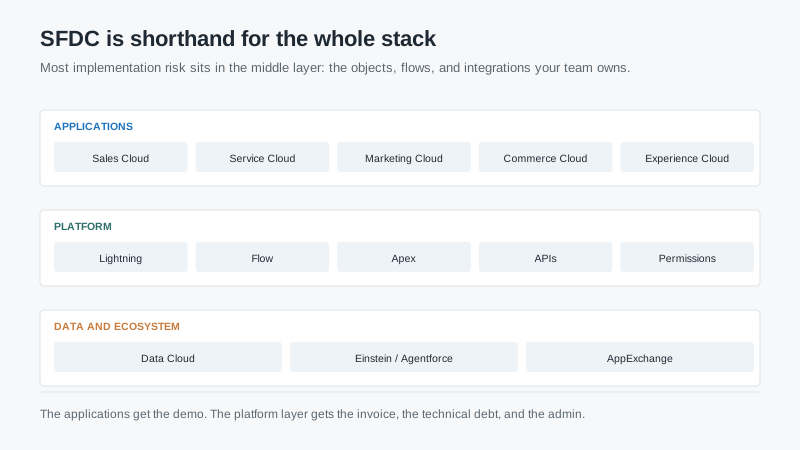
The application layer is what you demo: Sales Cloud, Service Cloud, Marketing Cloud, Commerce Cloud, Experience Cloud. Each has its own editions and its own licensing model, and a discount on one does not carry to another.
The platform layer is what you own: objects, fields, page layouts, permission sets, Flow automations, Apex code, and APIs. This is where implementation quality lives, and where most of the long-term cost accumulates. A clean org with ten well-documented flows is maintainable. An org with ninety flows built by four different consultants over five years is a permanent project.
The data and ecosystem layer is what you rent: Data Cloud, the AI products, and the AppExchange. AppExchange packages are convenient and they are also dependencies, with their own licenses, upgrade cycles, and support boundaries. Every package you install is a vendor relationship you now manage.
What SFDC work actually looks like
Buyers consistently underestimate the operational load. For a 50-user org with moderate customization, a single admin’s week fills up fast: user support, automation changes, data cleanup, reporting requests, integrations, release testing, and permissions.
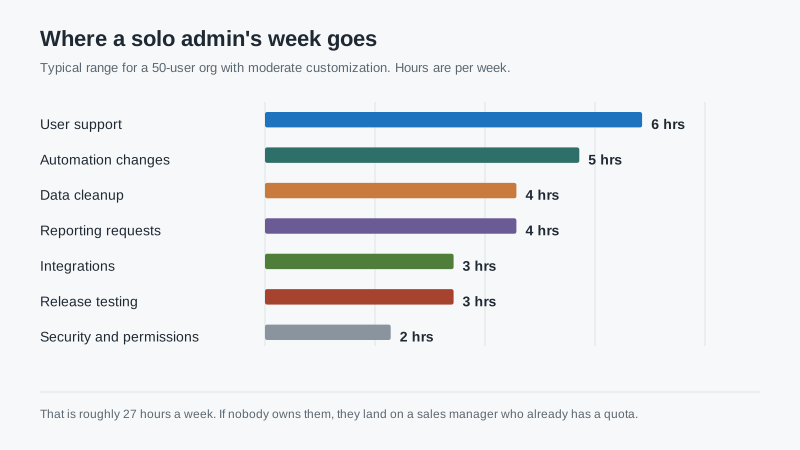
That is roughly 27 hours a week, before any project work. If nobody owns those hours, they land on a sales manager, an office manager, or an outside consultant. All three outcomes cost more than hiring for the role, and two of them cost more than people admit.
Release testing is the line buyers never see in the proposal. Salesforce pushes three major releases a year, and each one can change behavior in a Flow, a permission set, or an integration. Without a sandbox and someone accountable for regression testing, you find the break in production, usually on a Monday.
Where the cost hides
The subscription is visible. The rest is not.
Automation sprawl. Every process change becomes a new flow. Nobody deletes the old one because nobody is sure it is unused. Two years in, you have overlapping automations firing on the same object, and the only person who understands the sequence has left.
API limits. Integrations consume API calls, and lower editions have lower limits. A middleware tool that polls every five minutes can quietly exhaust a daily allocation, and the failure shows up as stale data rather than an error message.
Storage. File storage and data storage are separate allocations. Attachments and email logs consume them faster than most teams expect, and overage is billed.
Sandbox refreshes. Full sandboxes cost a percentage of your production contract. Partial and developer sandboxes are cheaper and often enough, but only if someone designs the testing process around their limits.
Seat types. Not every user needs a full sales license. Community, partner, and integration users have different pricing, and misclassifying them is a common source of true-up invoices at renewal.
What to ask before you commit
Ask which cloud and which edition, specifically. “Salesforce” is not a scope. Then ask what the edition does not include that your process needs, and get that list in writing before you sign.
Ask who will administer the org after go-live, and whether that person has done it before. Ask how many active flows, Apex classes, and installed packages the org will have at launch. Those three numbers predict your maintenance load better than any vendor slide.
Ask for a sandbox in the contract, not as a favor. Ask how release testing will work and who signs off. Ask what the exit looks like: full data export including attachments, custom objects, and field history.
And ask your partner who actually does the work. The senior architect in the sales cycle is often not the person at kickoff. That is not dishonest; it is staffing. But you should know the name and the utilization before you sign.
When SFDC is the wrong shorthand for your problem
Plenty of companies say “we need Salesforce” when what they need is a system their team will use. If the sales process is simple, the team is small, and nobody wants to administer a platform, the abbreviation is doing damage. It narrows the search before the requirements are written.
One 12-person company bought Enterprise edition because the founder had used SFDC at a previous job. They spent nine months and roughly $180,000 to replicate a process that a $15,000-a-year tool would have supported, and they still needed a part-time admin. The platform was not wrong. The reasoning was.
Start with the process, then the constraint, then the platform. If the answer is still Salesforce, buy it deliberately: pick the cloud, pick the edition, budget the admin, and negotiate the uplift. Our Salesforce cost guide walks through the first-year numbers, and the NYSE CRM explainer covers what the public filings signal about pricing direction.
Where this leaves you
SFDC means Salesforce. It is a stack, not a product, and the platform layer is where your money and your risk live. Budget the admin hours, test in a sandbox, keep the automation count low, and document what you build. Do those four things and the acronym stops being intimidating.

