A plumber I know runs a six-person shop and keeps his customer list in a notebook. When he asked me about a free CRM for small business, he did not want a platform. He wanted to stop losing the name of the person who called in March about a water heater. That is the right problem, and free tiers can solve it.
What free tiers cannot do is scale with you without a cost, and the cost is rarely the subscription. It is the time you spend working around limits, the data you cannot take with you, and the upgrade you are forced into at the worst possible moment. Here is what the free options actually include and where each one stops.
What the free tiers include
Four platforms dominate the free tier conversation, and they are not equivalent. Limits change, so verify current terms before you move a list.
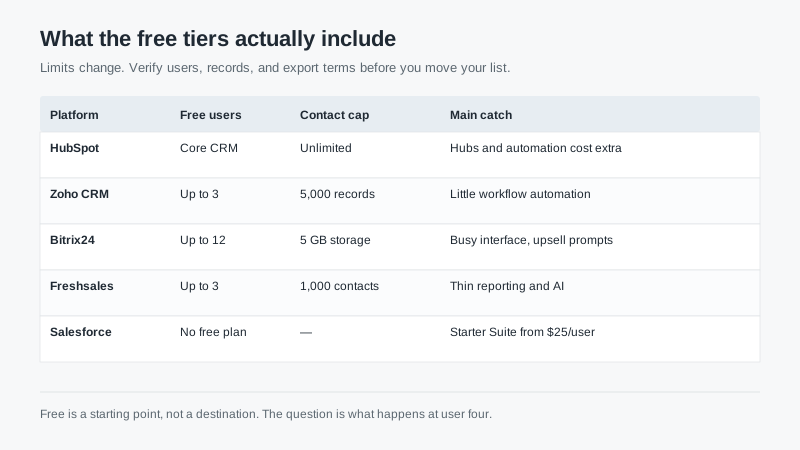
HubSpot gives you a real CRM with unlimited contacts and deal tracking. The catch is that the free tier is deliberately a gateway: automation, sequences, custom reporting, and most of the useful marketing features sit behind paid hubs. For a team that only needs a shared contact record, it is excellent. For a team that needs the CRM to do work on its own, it is a demo.
Zoho CRM offers a free plan for up to three users with a record cap. The interface is denser than HubSpot’s and the free tier is thin on automation, but it is a genuine CRM with modules, reports, and a path to paid tiers that cost less than most competitors.
Bitrix24 is the most generous on seats, with a free plan that covers a dozen users. It bundles tasks, chat, and a basic CRM into one workspace. The trade-off is complexity. I’ve watched small teams spend two weeks configuring Bitrix24 and then abandon it because it felt like moving into a house with too many rooms.
Freshsales gives a small number of users a clean interface and basic pipeline management. It is pleasant to use and limited in reporting, which matters once you want to know which source actually produces revenue.
Salesforce has no free plan. Starter Suite starts around $25 per user per month. It is worth mentioning because buyers often assume the biggest name has a free tier. It does not, and that is fine; it is not built for that market.
The cost that is not on the invoice
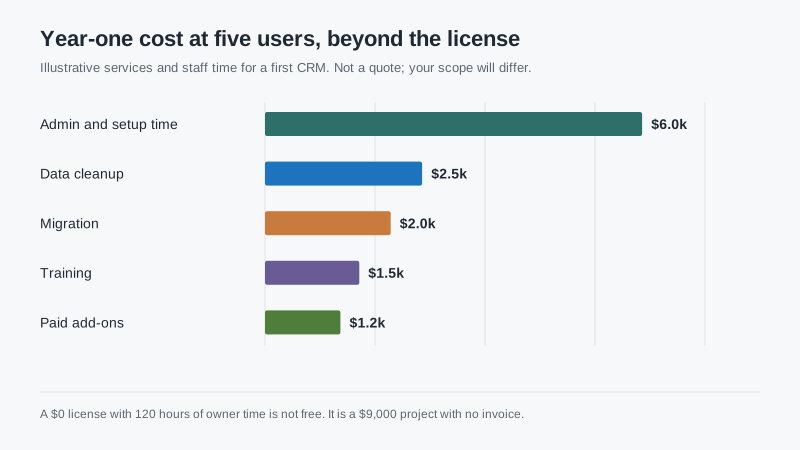
Free licenses still require setup, cleanup, and training. For a five-person team, the first year usually involves 80 to 150 hours of someone’s time. At $75 an hour, that is $6,000 to $11,000, and it does not appear anywhere in the vendor’s pricing page.
There is also the switching cost. A free tier that caps records or users will eventually force a migration, and migrations are where small teams lose data. Ask for the export before you import anything. If the export does not include activity history, notes, and attachments in a usable format, you are renting your customer list rather than owning it.
When free is the right answer
Free is right when you are under five users, your sales process is simple, and you have never used a CRM before. The goal in that phase is not optimization. It is learning whether your team will enter data at all.
Start with the free tier, run it for ninety days, and measure one thing: what percentage of deals have a next-step date. If that number is above 70% after three months, you have a habit worth investing in. If it is below 30%, a paid platform will not fix it, and you just saved yourself a year of subscription.
Free is also right for a side business, a solo consultant, or a team that genuinely sells four deals a month. There is no prize for buying more software than you use.
When free becomes expensive
The first warning sign is a workaround. You export to a spreadsheet to build a report. You keep a separate document for call notes because the free tier’s activity log is thin. You ask one person to be the human router for leads because round-robin is a paid feature. Workarounds are a tax, and they compound.
The second is a user cap. Adding the fourth salesperson and discovering the free plan stops at three is a bad week. Model your headcount twelve months out before you choose.
The third is data volume. Record caps and storage limits arrive quietly. A company that imports a 15,000-row list into a plan with a 5,000-record limit learns an expensive lesson about reading the terms.
The fourth is support. Free tiers usually come with community support. When the CRM is how your team runs its day, waiting two days for an answer is a real cost.
A migration path that does not hurt
Pick a free tier that belongs to a paid platform you would plausibly buy. HubSpot free to HubSpot Starter is a config change. Zoho free to Zoho Standard is a billing change. That continuity is worth more than a slightly better free feature set from a vendor you would never pay.
Before you migrate, do three things. Export your data and confirm it opens. Clean duplicates while the list is small, because it will never be easier. Write down your stage definitions on one page so the paid platform can be configured to match, not the other way around.
Then set an upgrade trigger in advance. For example: upgrade when we hit four users, or when we need automated follow-up, or when the monthly report takes more than an hour to assemble. A written trigger prevents both premature spending and the slow drift into workarounds.
The honest recommendation
For most small businesses asking about a free CRM, start with HubSpot’s free tier if you want the easiest path and a plausible upgrade, or Zoho’s free plan if you want a lower long-term price and do not mind a denser interface. Use Bitrix24 only if you want tasks and chat in the same place and have someone who enjoys configuring software.
Spend the first month on data hygiene and stage definitions, not on features. The platform you choose matters less than whether the record is complete and the team trusts it.
When you outgrow free, our CRM shortlist guide covers what to compare at the next tier, and the fundamentals guide explains the adoption habits that make the upgrade worth paying for.

