Search “best CRM software” and you get forty numbered lists, most of them written by someone who has never had to explain a failed migration to a CFO. They rank platforms on features that all of them have and ignore the constraints that actually decide the purchase.
I have sat on the buyer’s side of six CRM selections and cleaned up after four more. The pattern is consistent. The platform matters less than the fit between your sales motion, your admin capacity, and your data quality. This guide is a process for narrowing the field, not a ranking, because a ranking without your constraints is just someone else’s opinion with a number attached.
Start with constraints, not features
Write four things down before you open a single vendor site.
Team size and growth. Twelve sellers today, eighteen next year. Seat pricing compounds, and so does admin load.
Sales motion. High-volume transactional selling, relationship-led B2B, field sales, or a service-heavy account base. These four motions want different defaults, different pipelines, and different reporting.
Admin capacity. Who will own this system? A named person with ten hours a week, a part-time operations manager, or nobody. Be honest. “Nobody” is a valid answer and it eliminates half the market.
Non-negotiables. Usually an ERP integration, a phone system, a quoting tool, or a compliance requirement. Two or three, not fifteen.
Everything else is preference. And preference is where buyers waste months.
The shortlist, scored on trade-offs
For a 20-user B2B sales team with no dedicated administrator, five platforms cover most of the realistic field. Each wins on something and loses on something else.
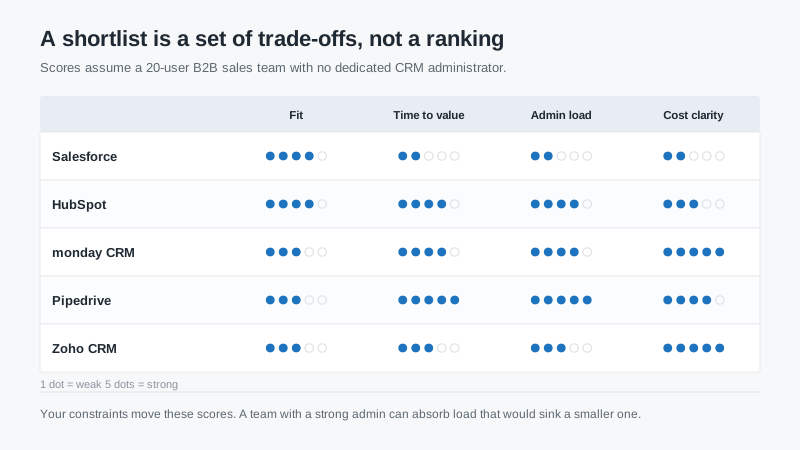
Salesforce scores highest on fit and lowest on almost everything else for this profile. That is not a knock. It means the platform can model nearly any process, and you will pay for that capability in time, money, and admin attention.
HubSpot balances well. The shared record across marketing and sales is a real advantage, and the interface is learnable in a week. The contact-tier pricing is the catch.
monday CRM wins on cost clarity and flexibility. Boards are easy to reshape, which is great for teams whose process is still evolving and risky for teams that need a stable data model.
Pipedrive is the cleanest pipeline tool in the group. Fast to set up, easy to teach, and thin once you need service tickets or complex reporting.
Zoho CRM is the value play. Broad feature set for the price, with an interface and admin experience that feels more assembled than designed.
What the three-year number looks like
Single “starting at” prices are useless because nobody buys the starting tier for long. The useful comparison is a range that reflects realistic edition and seat mix over three years, excluding implementation.
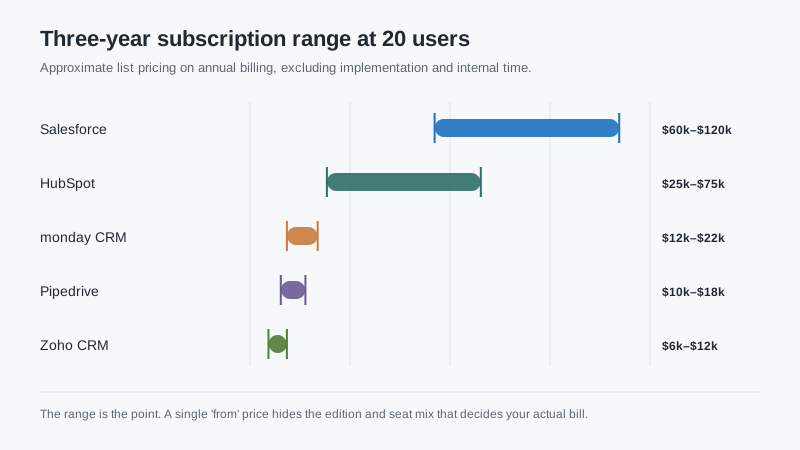
Note how wide the ranges are. The top of the Salesforce range reflects Enterprise edition at list; the bottom reflects a smaller seat count or a negotiated Pro Suite deal. That spread is not noise. It is the negotiation and the tier decision, which is where most of the money is won or lost.
Whatever number you land on, add implementation and internal time before you compare. A platform at $30,000 over three years with $40,000 of implementation is not cheaper than one at $60,000 with $8,000 of implementation.
Run the same demo three times
Every vendor gets the same three scenarios, drawn from your worst week. Not their canned demo. Yours.
Scenario one: a rush order from an existing customer who needs a partial shipment and a changed billing address. Watch how many clicks it takes and whether the rep can see the last three orders without leaving the record.
Scenario two: a lead that comes in through a partner referral, gets reassigned twice, and needs a quote with a discount approval. Watch how routing and approval work, and whether the audit trail is readable.
Scenario three: a renewal that is at risk because of a support issue. Watch whether service history and sales history sit on the same screen.
Time each one. Ask the sales engineer to do it without preparing slides. Hesitation is data. So is the phrase “that would be a customization.”
Test the data before you test the software
Ask each finalist to load a sample of your real data: 500 accounts, 2,000 contacts, a year of closed deals with line items. Not a clean sample. The messy one, with duplicate companies and inconsistent phone formats.
Then look at three things. How long did the import take? What did it do with duplicates? And can a normal user find a specific customer by the name the customer actually uses, not the name in your ERP?
Two finalists once tied on every feature and separated completely on this test. One loaded the sample in an afternoon and surfaced duplicates for review. The other silently created 600 new company records and took a week to clean up. That is the whole decision, right there.
Ask about the exit while you are still excited
Exit terms are the least romantic part of a CRM purchase and the most expensive to get wrong. Ask for a full export, in a documented format, including attachments and custom fields. Ask whether the export is included or billed. Ask how long the vendor retains your data after termination.
Then ask about pricing at renewal. What is the uplift cap, if any? What happens to your discount when you add seats? Can you downgrade, and what do you lose? Get the answers in the contract, not in an email from the rep.
A CRM you cannot leave cheaply is not a partnership. It is a hostage situation with a nice interface.
Red flags worth walking away from
A vendor that will not give you a sandbox before you sign. A partner who cannot name the consultant who will actually do the work. An implementation quote that does not separate configuration from migration. A pricing sheet with no contact or record limits. A reference call where the customer cannot remember what the project cost.
None of these are automatic disqualifiers on their own. Two of them together usually means the project will be harder than the demo suggested.
The process that works
Narrow to five on constraints, score them on trade-offs, run your own scenarios, test with your own dirty data, and read the exit clause before the feature list. That takes three weeks and saves a year.
If you want a faster starting point, our breakdown of the best CRM by team shape maps four common sales motions to a first shortlist. And if budget is the binding constraint, the free CRM comparison shows what you can learn at zero cost before committing.
The best CRM software is the one your team keeps updated in month nine, when the novelty is gone and the quarter is behind plan. Optimize for that, not for the demo.

