Eight years ago I sat in the conference room of a family-owned HVAC distributor outside Columbus while the owner opened their CRM to prove it was working. There were 4,100 contacts, 38 open deals, and not one note from the last five months. The system had been live for two years. The sales team had quietly gone back to a shared inbox and a legal pad by week six.
That is the normal outcome when customer relationship management gets sold as software instead of a habit. The license was never the problem. Nobody had decided who owned the data, what a “qualified” lead meant, or what happened when a rep left with a phone full of contacts.
This guide is about the part that survives the demo. What a CRM is actually for, what it costs beyond the subscription, and how to tell whether your team will still be using it in month nine.
What customer relationship management means in practice
Strip away the marketing and a CRM does one job: it keeps a shared, current record of every customer interaction so that work can move between people without starting over. That sounds modest. It is also the difference between a lead that gets called in nine minutes and one that gets called in three days.
In a small company the record usually lives in three places at once. Accounting has the billing history. The owner has the relationship. The rep has the last conversation, in their head or their phone. A CRM’s real value is collapsing those into one timeline that a new hire can read.
Everything else is a feature. Pipelines, sequences, dashboards, lead scoring, and AI summaries are all conveniences built on top of that record. If the record is incomplete, the conveniences make the incompleteness faster.
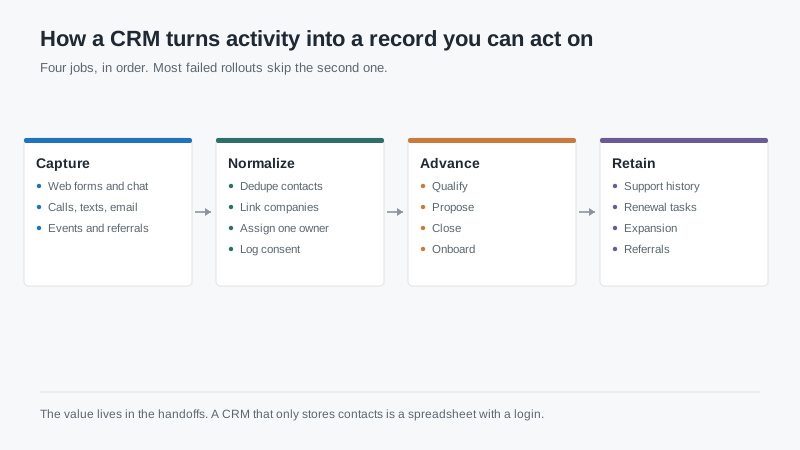
The four jobs, in order
Capture is the easy part and the only part most vendors demo. Forms, calls, texts, walk-ins, referrals, trade show badges. If capturing requires more than a click, your reps will stop doing it, and no amount of training fixes a form with fourteen required fields.
Normalize is where projects quietly die. Two reps spell the same company four ways. One customer has three ship-to addresses and a parent company nobody linked. Duplicates pile up because the import ran twice in 2021 and nobody wants to touch it now. Normalization is unglamorous, and it is the difference between a search that returns the right account and one that returns eleven.
Advance is the sales process: qualify, propose, close, onboard. This is where stage definitions matter. A stage without exit criteria is not a stage. It is a waiting room, and deals sit in it until someone asks why the forecast missed by 30%.
Retain is the job most small teams skip. Support history, renewal dates, expansion conversations, and the referrals that come from a customer who actually remembers you. If your CRM stops at “closed won,” you paid for a lead tracker, not a customer system.
What a CRM will not fix
It will not fix a sales process nobody follows. It will not make a rep with a 9% close rate into a 25% closer. It will not replace the account manager who remembers that a customer’s plant shuts down for two weeks in July.
It also will not clean your data for you. I’ve watched three companies buy a new CRM specifically because their old one was messy. Two of them reproduced the same mess in under a year, because the problem was a missing rule about who may create a company record, not the database engine.
The honest test before you buy anything: can you write down, on one page, how a lead moves from first contact to invoice? If that page does not exist, buy nothing yet. Write it first. The CRM you choose will be a direct copy of that page, including its flaws.
Where the budget actually goes
For a 10 to 25 person team, first-year spending usually breaks down into subscription, implementation help, integrations, training, and internal time. The last line is the one nobody puts in the proposal.
Internal time is real money even when it does not show up on an invoice. A controller who spends 60 hours mapping fields and testing imports is not doing the close. An owner who spends every Friday afternoon cleaning duplicates is not selling. At a loaded cost of $75 an hour, 200 hours is $15,000, and that is a conservative estimate for a first implementation.
Implementation help is worth paying for in narrow doses. Pay for data migration design, for the two or three automations that actually matter, and for a handoff that leaves someone on your payroll able to maintain the thing. Do not pay for a 40-page configuration document nobody reads.
Adoption is the product
Every CRM failure I’ve seen came down to adoption. Not features, not price, not uptime. The team kept using the old way because the new way was slower for the first three weeks and nobody was willing to absorb that.
Three things move the needle more than training sessions. First, make the CRM the only place a deal can be forecast from. If the Monday pipeline meeting runs off a spreadsheet, the spreadsheet wins. Second, reduce required fields to the ones a manager would actually act on. Third, have the owner or sales lead use it visibly. Teams copy what the person who signs their commission check does.
If your CRM is not the system of record for the forecast, it is a diary. Diaries are optional.
Measure one thing per stage
Dashboards multiply because each one is easy to build. Pick a single metric per stage and assign an owner. Cost per qualified lead for marketing. Time to first touch for the rep. Stage age for the manager. Time to first value for onboarding. Net revenue retention for the account team.
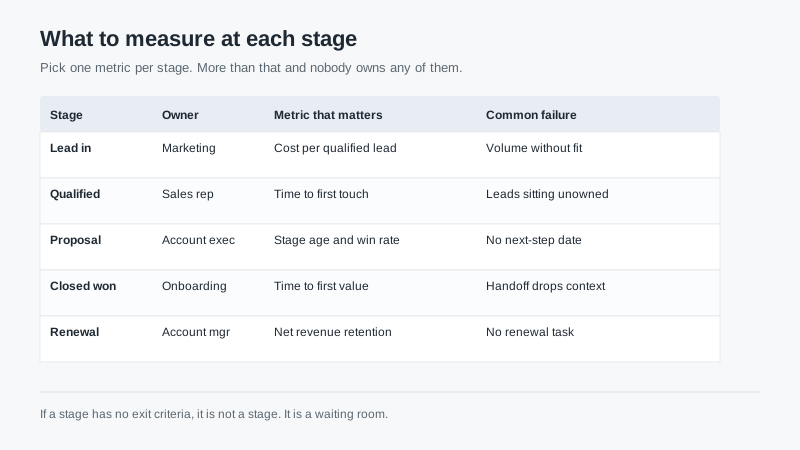
Five numbers is enough to run a small sales team. If you cannot say which stage is leaking, more reports will not help. The leak is usually visible in one afternoon of reading actual deal notes, which is a better use of time than building another dashboard.
Questions worth asking before you sign
Ask what happens to your data if you leave. Ask for the export in writing, including custom fields and attachments. Ask whether the export costs money. I’ve seen an exit quote in the mid five figures for records a company created itself.
Ask who administers the system after the partner leaves, and what that person’s week looks like. Ask how many hours a month the vendor’s own support team expects to spend on a company your size. Ask what breaks first when you hit the contact or automation limit on your tier.
Then ask the question most buyers skip: what will we stop doing? A CRM adds a system. If nothing gets retired, you have added work, not replaced it. The teams that succeed usually kill a spreadsheet, a group inbox, and a weekly status meeting in the first quarter.
For a closer look at how the major platforms compare on cost and fit, our CRM software shortlist guide walks through the trade-offs. And if you are earlier in the process, the free tier comparison is a cheap way to learn what your team will actually use before you spend anything.
The short version
Customer relationship management works when three conditions hold: the record is complete, the stages have definitions, and the forecast comes from the system. Miss any one of those and you have bought a database with a login screen.
Start with your worst week, not the vendor’s best demo. Map three real deals that went sideways and ask how the system would have caught them. If the answer is “it wouldn’t,” keep shopping. If the answer is “here is the field and the alert,” you are close.

